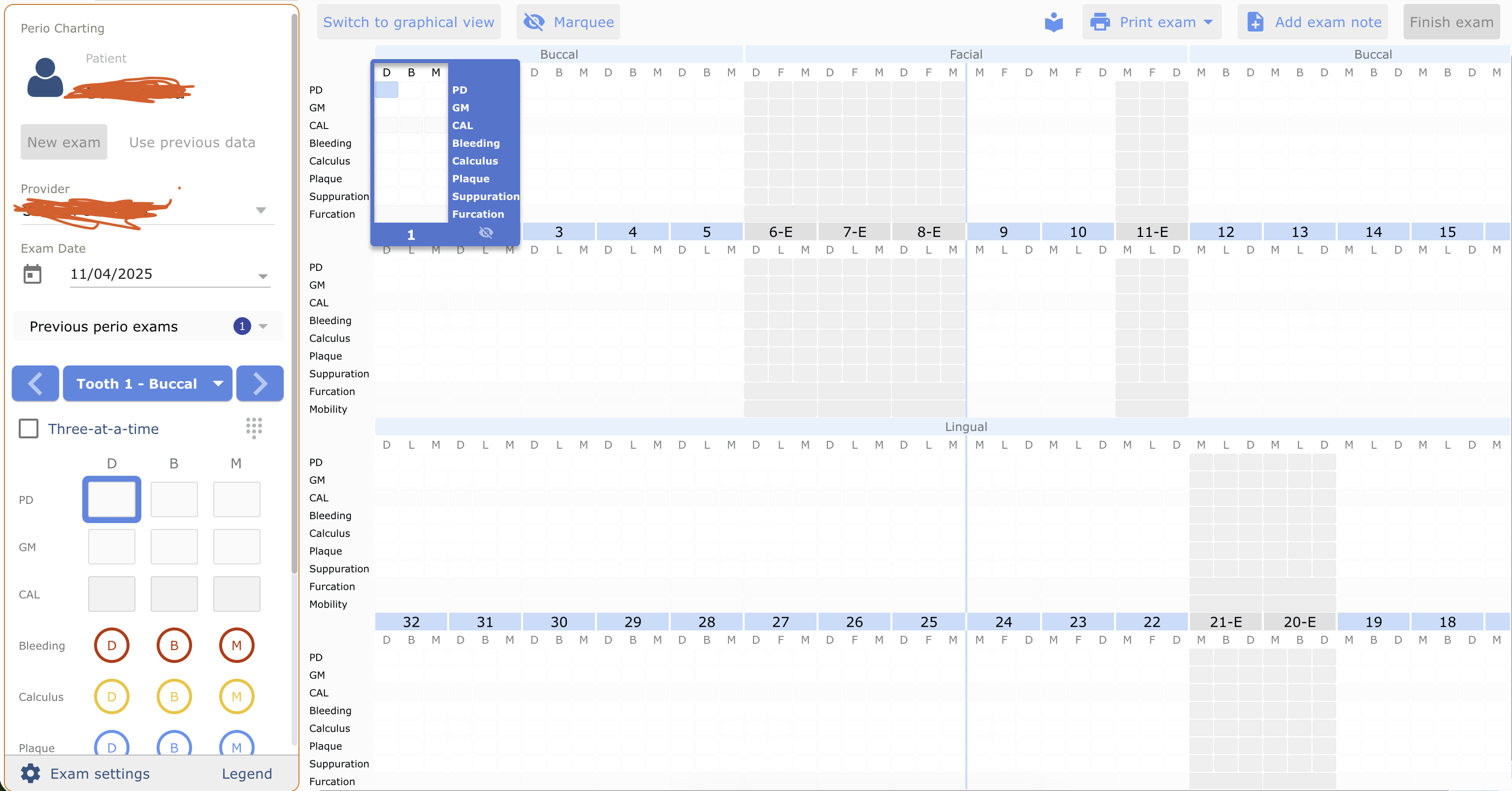
Hi linuxkaliphone, thanks for your help. This is inside a Chrome browser.
Here is the specific element that gets highlighted when I inspect the light blue box (the small one with D above and PD to the left of it):
<div class="condition active-field" ng-class="{'alert-value': $ctrl.isAlertValue({value: $ctrl.toothData.PD[surface.dataIndex]}),
                                 'active-field': $ctrl.isFieldHighlighted('PD', surfaceIndex)}" ng-click="$ctrl.conditionClicked('PD', surfaceIndex)" role="button" tabindex="0">

                 </div>
This is what I get when I’m inspecting everything inside the blue box (starting with D B M on top, down to the row with Furcation to the left):
<hero-perio-tooth-side side="'buccal'" tooth-number="::$ctrl.toothNumber" selected-site="$ctrl.selectedSite" tooth-data="$ctrl.toothData" force-active="$ctrl.forceActive" is-alert-value="$ctrl.isAlertValue({value})" chartable-items="$ctrl.chartableItems" set-selected-site="$ctrl.setSelectedSite({toothNumber: toothNumber, side: side})" set-current-field="$ctrl.setCurrentField({condition: condition, index: index})" are-surfaces-reversed="$ctrl.areSurfacesReversed({toothNumber: toothNumber, side: side})" active-field="$ctrl.activeField" start-condition="$ctrl.startCondition"><div class="tooth-side active" ng-class="{'active': ($ctrl.selectedSite.tooth === $ctrl.toothNumber && $ctrl.selectedSite.side === $ctrl.side) || $ctrl.forceActive}">
<div class="surfaces">
<!----><div class="surface" ng-repeat="(surfaceIndex, surface) in $ctrl.surfaces">
<div class="condition tooth-side-header">D</div>
<div class="pd-gm layout-column" layout="column" ng-class="{'reverse': $ctrl.startCondition === 'gingival_margin'}">
<div class="condition active-field" ng-class="{'alert-value': $ctrl.isAlertValue({value: $ctrl.toothData.PD[surface.dataIndex]}),
'active-field': $ctrl.isFieldHighlighted('PD', surfaceIndex)}" ng-click="$ctrl.conditionClicked('PD', surfaceIndex)" role="button" tabindex="0">
</div>
<div class="condition" ng-class="{'alert-value': $ctrl.isAlertValue({value: $ctrl.toothData.GM[surface.dataIndex]}),
'active-field': $ctrl.isFieldHighlighted('GM', surfaceIndex)}" ng-click="$ctrl.conditionClicked('GM', surfaceIndex)" role="button" tabindex="0">
</div>
</div>
<div class="condition cal" ng-class="{'alert-value': $ctrl.isAlertValue({value: $ctrl.toothData.CAL[surface.dataIndex]})}" ng-click="$ctrl.conditionClicked('CAL', surfaceIndex)" role="button" tabindex="0">
</div>
<!----><div class="condition bleeding" ng-repeat="boolCondition in $ctrl.boolConditions | filter: $ctrl.isConditionEnabled" ng-class="boolCondition" ng-click="$ctrl.conditionClicked(boolCondition, surfaceIndex)" role="button" tabindex="0">
<div class="indicator ng-hide" ng-show="$ctrl.toothData[boolCondition][surface.dataIndex]" aria-hidden="true">
</div>
</div><!----><div class="condition calculus" ng-repeat="boolCondition in $ctrl.boolConditions | filter: $ctrl.isConditionEnabled" ng-class="boolCondition" ng-click="$ctrl.conditionClicked(boolCondition, surfaceIndex)" role="button" tabindex="0">
<div class="indicator ng-hide" ng-show="$ctrl.toothData[boolCondition][surface.dataIndex]" aria-hidden="true">
</div>
</div><!----><div class="condition plaque" ng-repeat="boolCondition in $ctrl.boolConditions | filter: $ctrl.isConditionEnabled" ng-class="boolCondition" ng-click="$ctrl.conditionClicked(boolCondition, surfaceIndex)" role="button" tabindex="0">
<div class="indicator ng-hide" ng-show="$ctrl.toothData[boolCondition][surface.dataIndex]" aria-hidden="true">
</div>
</div><!----><div class="condition suppuration" ng-repeat="boolCondition in $ctrl.boolConditions | filter: $ctrl.isConditionEnabled" ng-class="boolCondition" ng-click="$ctrl.conditionClicked(boolCondition, surfaceIndex)" role="button" tabindex="0">
<div class="indicator ng-hide" ng-show="$ctrl.toothData[boolCondition][surface.dataIndex]" aria-hidden="true">
</div>
</div><!---->
</div><!----><div class="surface" ng-repeat="(surfaceIndex, surface) in $ctrl.surfaces">
<div class="condition tooth-side-header">B</div>
<div class="pd-gm layout-column" layout="column" ng-class="{'reverse': $ctrl.startCondition === 'gingival_margin'}">
<div class="condition" ng-class="{'alert-value': $ctrl.isAlertValue({value: $ctrl.toothData.PD[surface.dataIndex]}),
'active-field': $ctrl.isFieldHighlighted('PD', surfaceIndex)}" ng-click="$ctrl.conditionClicked('PD', surfaceIndex)" role="button" tabindex="0">
</div>
<div class="condition" ng-class="{'alert-value': $ctrl.isAlertValue({value: $ctrl.toothData.GM[surface.dataIndex]}),
'active-field': $ctrl.isFieldHighlighted('GM', surfaceIndex)}" ng-click="$ctrl.conditionClicked('GM', surfaceIndex)" role="button" tabindex="0">
</div>
</div>
<div class="condition cal" ng-class="{'alert-value': $ctrl.isAlertValue({value: $ctrl.toothData.CAL[surface.dataIndex]})}" ng-click="$ctrl.conditionClicked('CAL', surfaceIndex)" role="button" tabindex="0">
</div>
<!----><div class="condition bleeding" ng-repeat="boolCondition in $ctrl.boolConditions | filter: $ctrl.isConditionEnabled" ng-class="boolCondition" ng-click="$ctrl.conditionClicked(boolCondition, surfaceIndex)" role="button" tabindex="0">
<div class="indicator ng-hide" ng-show="$ctrl.toothData[boolCondition][surface.dataIndex]" aria-hidden="true">
</div>
</div><!----><div class="condition calculus" ng-repeat="boolCondition in $ctrl.boolConditions | filter: $ctrl.isConditionEnabled" ng-class="boolCondition" ng-click="$ctrl.conditionClicked(boolCondition, surfaceIndex)" role="button" tabindex="0">
<div class="indicator ng-hide" ng-show="$ctrl.toothData[boolCondition][surface.dataIndex]" aria-hidden="true">
</div>
</div><!----><div class="condition plaque" ng-repeat="boolCondition in $ctrl.boolConditions | filter: $ctrl.isConditionEnabled" ng-class="boolCondition" ng-click="$ctrl.conditionClicked(boolCondition, surfaceIndex)" role="button" tabindex="0">
<div class="indicator ng-hide" ng-show="$ctrl.toothData[boolCondition][surface.dataIndex]" aria-hidden="true">
</div>
</div><!----><div class="condition suppuration" ng-repeat="boolCondition in $ctrl.boolConditions | filter: $ctrl.isConditionEnabled" ng-class="boolCondition" ng-click="$ctrl.conditionClicked(boolCondition, surfaceIndex)" role="button" tabindex="0">
<div class="indicator ng-hide" ng-show="$ctrl.toothData[boolCondition][surface.dataIndex]" aria-hidden="true">
</div>
</div><!---->
</div><!----><div class="surface" ng-repeat="(surfaceIndex, surface) in $ctrl.surfaces">
<div class="condition tooth-side-header">M</div>
<div class="pd-gm layout-column" layout="column" ng-class="{'reverse': $ctrl.startCondition === 'gingival_margin'}">
<div class="condition" ng-class="{'alert-value': $ctrl.isAlertValue({value: $ctrl.toothData.PD[surface.dataIndex]}),
'active-field': $ctrl.isFieldHighlighted('PD', surfaceIndex)}" ng-click="$ctrl.conditionClicked('PD', surfaceIndex)" role="button" tabindex="0">
</div>
<div class="condition" ng-class="{'alert-value': $ctrl.isAlertValue({value: $ctrl.toothData.GM[surface.dataIndex]}),
'active-field': $ctrl.isFieldHighlighted('GM', surfaceIndex)}" ng-click="$ctrl.conditionClicked('GM', surfaceIndex)" role="button" tabindex="0">
</div>
</div>
<div class="condition cal" ng-class="{'alert-value': $ctrl.isAlertValue({value: $ctrl.toothData.CAL[surface.dataIndex]})}" ng-click="$ctrl.conditionClicked('CAL', surfaceIndex)" role="button" tabindex="0">
</div>
<!----><div class="condition bleeding" ng-repeat="boolCondition in $ctrl.boolConditions | filter: $ctrl.isConditionEnabled" ng-class="boolCondition" ng-click="$ctrl.conditionClicked(boolCondition, surfaceIndex)" role="button" tabindex="0">
<div class="indicator ng-hide" ng-show="$ctrl.toothData[boolCondition][surface.dataIndex]" aria-hidden="true">
</div>
</div><!----><div class="condition calculus" ng-repeat="boolCondition in $ctrl.boolConditions | filter: $ctrl.isConditionEnabled" ng-class="boolCondition" ng-click="$ctrl.conditionClicked(boolCondition, surfaceIndex)" role="button" tabindex="0">
<div class="indicator ng-hide" ng-show="$ctrl.toothData[boolCondition][surface.dataIndex]" aria-hidden="true">
</div>
</div><!----><div class="condition plaque" ng-repeat="boolCondition in $ctrl.boolConditions | filter: $ctrl.isConditionEnabled" ng-class="boolCondition" ng-click="$ctrl.conditionClicked(boolCondition, surfaceIndex)" role="button" tabindex="0">
<div class="indicator ng-hide" ng-show="$ctrl.toothData[boolCondition][surface.dataIndex]" aria-hidden="true">
</div>
</div><!----><div class="condition suppuration" ng-repeat="boolCondition in $ctrl.boolConditions | filter: $ctrl.isConditionEnabled" ng-class="boolCondition" ng-click="$ctrl.conditionClicked(boolCondition, surfaceIndex)" role="button" tabindex="0">
<div class="indicator ng-hide" ng-show="$ctrl.toothData[boolCondition][surface.dataIndex]" aria-hidden="true">
</div>
</div><!---->
</div><!---->
</div>
<!----><div class="furcation-mobility" ng-if="$ctrl.chartableItems.includes('furcation')" ng-class="{'furcation-reverse': $ctrl.shouldReverseFurcation()}">
<div class="condition" ng-class="{set: $ctrl.isFurcationSet($ctrl.toothData.furcation[$ctrl.furcationIndex][0])}" ng-click="$ctrl.conditionClicked('furcation', 0)" role="button" tabindex="0">
</div>
<!----><div class="condition" ng-if="$ctrl.hasDoubleFurcations" ng-class="{set: $ctrl.isFurcationSet($ctrl.toothData.furcation[$ctrl.furcationIndex][1])}" ng-click="$ctrl.conditionClicked('furcation', 1)" role="button" tabindex="0">
</div><!---->
</div><!---->
<!---->
</div>
</hero-perio-tooth-side>
Any help would be much appreciated! Thank you!